Cash Receipts Drawer Listing Instructions
Use the Cash Receipts Drawer Listing to generate a listing of the cash and checks that have been recorded but not yet posted to customer accounts. The list consists of the cash and checks that are in the cash file. The Drawer listing can be generated by clerk and batch. These options can be handy when clerks are trying to reconcile their drawers.
Tips:
For more information about running reports, see Print View.
For more information about the buttons on the toolbar, see the Reporting Toolbar.
To see an example of the report, click Cash Receipts Drawer Listing Sample.
To open, at Quick Launch enter Drawer Listing and from the list click Drawer Listing.
Or, click Daily Work
from the menu. Then,
click Cash Receipts, Utilities,
and Service Cash Disbursement.
Or, use the keyboard
shortcut: [ALT] [y]
[c] [u] [d].
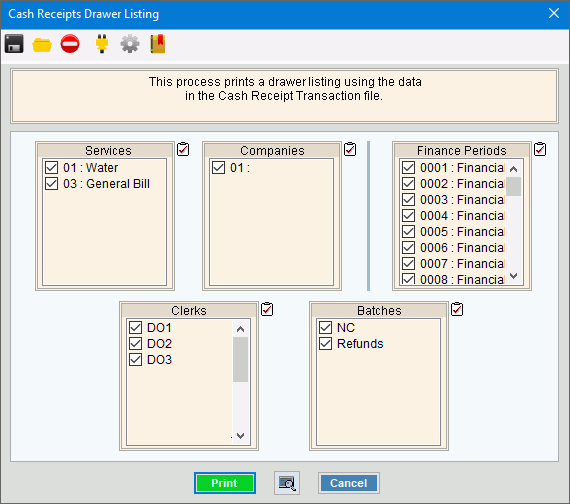
Cash Receipts Drawer Listing Window Example:
Cash Receipts Drawer Listing Prompts Tip: To quickly
select or de-select all
items listed, click Check All
|
|
To select the services to include, click to check the appropriate services listed. |
|
To select the companies to include, click to check the appropriate companies listed. |
|
To select the finance periods to include, click to check the appropriate periods listed. |
|
To select the clerks to include, click to check the appropriate clerks listed. Tip: You can set up a specific disbursement clerk ID for this process, if desired. |
|
To select the batches to include, click to check the appropriate batches listed. |
|
|
To begin printing, click Print, or press [ENTER]. Keyboard shortcut: [ALT + p] Or,
to print to the Print View
window, click Print View Or, to escape from the print routine,
click Cancel Keyboard shortcut: [ALT + c] |

 .
.

