To display the Interest Calculation Detail Area, double-click an interest transaction in the Tax Detail Area.
To close
the Interest Calculation Detail window, click the Close
 button.
Tax Receipt Entry - Interest Calculation Detail Area
The table following the window example describes the fields in the Interest Calculation Detail Area for Tax Receipt Entry. This area displays the factors used to calculate the Interest Amount, which is displayed in the Tax Detail Area. Each line represents an existing tax detail transaction from Tax Billing for a specific Due Date. Tax charges for tax bills, previous payments, and other types of transactions can be included. The final line, which is labeled TOTAL Interest, represents the interest calculation for the payment you are currently entering.
Note: For additional information, refer to Understanding Interest Charges.
Navigation Tips:
To display the Interest Calculation Detail Area, double-click an interest transaction in the Tax Detail Area.
To close
the Interest Calculation Detail window, click the Close
button.
Example:
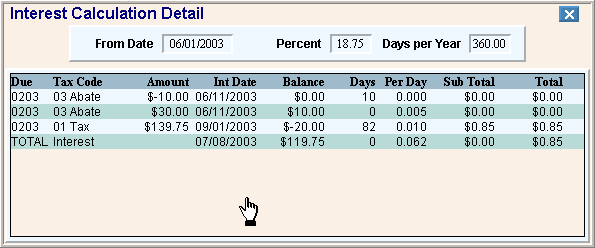
|
Interest Calculation Detail Area Prompts Tip: To see more information about a field, click the hyperlink for the field name. Note: If multiple payments are made against a specific Due Date, multiple lines of detail appear. |
|
|
From Date |
Displays the From Date, which is stored in the INTCAL table for the specific Due Date. |
|
Percent |
Displays the Interest Rate Percentage from the INTCAL table. |
|
Days per Year |
Displays the Interest Days Per Year from the INTCAL table. |
|
Displays the Due Date for the tax detail transaction (from the Tax Billing module). | |
|
Displays the Tax Type Code for the tax detail transaction (from the Tax Billing module). | |
|
Amount |
Displays the transaction amount for the tax detail transaction (from the Tax Billing Module). |
|
Displays the Interest Date for the tax detail transaction (from the Tax Billing module). | |
|
Displays the Previous Balance for the Tax Account for the Due Date. Note: This is always zero for the initial tax charge transaction. | |
|
Days |
Displays the calculated number of days against which interest must be applied. Note: This is always zero for the initial tax charge transaction. |
|
Per Day |
Displays the calculated interest amount per day. Previous Balance X [Interest Rate Percentage/100] / # Days Per Year = Per Day Example: 629.95 X [18.75/100] / 360 = 0.328 Note: This is always zero for the initial tax charge transaction. |
|
Sub Total |
Displays the calculated interest for the payment transaction on this line. Per Day X Days = Sub Total Example: 0.328 X 90 = $29.53 Note: This is always zero for the initial tax charge transaction. |
|
Total |
Displays the sum of the Total from the previous line and the Sub Total from this line. This amount accumulates if there are multiple payments for the Due Date. Note: This is always zero for the initial tax charge transaction. |
|
|
Closes the Interest Calculation Detail Window. |
