Federal Tax Summary Report
Use the Federal Tax summary Report to report the quarterly earnings and FICA amounts for the employees. The Federal Tax Summary report is similar to the Federal Tax report. The report detail supports line 1, 2, 3 and 5a, which should match one of the totals on the last page of the detail report.
Directions:
To open, click Reporting
from the Menu. Then,
click Government Reports and
Federal Tax Summary Report.
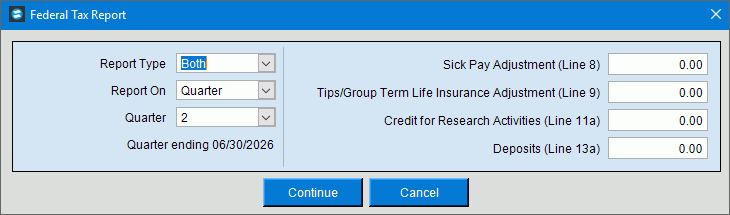
Federal Tax Summary Report Window Example:
Federal Tax Report (941) Prompt Options
|
|
Report Type |
Select one of the following: Both (summary and detail), Summary, or Detail. |
Report On |
Select quarter or month for the data to report. |
Quarter |
To specify the quarter of the year to include in the report, click one of the options in the list. (1 through 4) |
Quarter Ending |
Displays end date of the quarter included in the report. (MM/DD/CCYY) |
Sick Pay Adjustment (line 8) |
Enter an amount for a sick pay adjustment if applicable. |
Tips/Group Term Life Insurance Adjustment (Line 9) |
Enter an amount for a tips/term life insurance adjustment if applicable. |
Credit for Research Activities (Line 11a) |
Enter an amount for a credit for research activities if applicable. |
Deposits (Line 13a) |
Enter an amount for deposits. |
|
After entering the report prompts, click Continue to display the Report Writer prompts. Keyboard shortcut: [ALT + o] To escape from the print routine, click
Cancel Keyboard shortcut: [ALT + c] |

 .
.