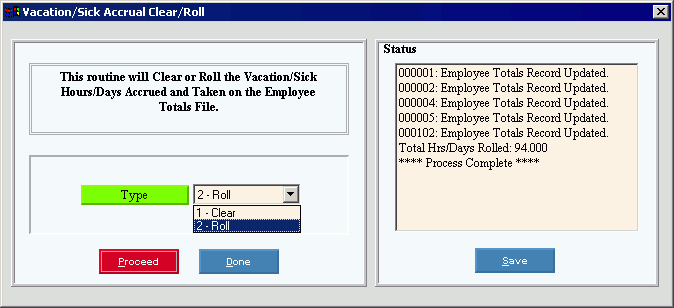
Vacation/Sick Accrual Clear/Roll Process
Use the Vacation/Sick Accrual Clear/Roll routine to clear or roll the accrued vacation and sick hours.
Notes:
If you base vacation and sick accrual time on the anniversary of the employee's hire date or contract date, do not run the Vacation/Sick Clear or Roll process. Instead, you must manually maintain the vacation and sick accrued time and taken time.
Run the clear or roll according to your facilities schedule for vacation and sick accrual.
NDS recommends running a backup before any Month, Quarter, or Year End process.
Directions:
To open click Utilities from
the Menu. Then click
Month/Qtr/Year End Clear and
click Vacation/Sick Accrual Clear/Roll.
Or, use the keyboard
shortcut: [ALT] [t] [m] [v].
Vacation/Sick Accrual Clear/Roll Process Window Example:
Vacation/Sick Accrual Clear/Roll Process Options
|
|
Type |
Specify if you want to clear or roll the accrued vacation and sick time by selecting one of the following options:
|
|
To run the routine, click Proceed, or press [ENTER]. Keyboard shortcut: [ALT + p] |
|
To escape from the routine, click Done. Keyboard shortcut: [ALT + d] |
Status |
Displays messages about the progress of the routine. |
|
To save the status messages in a file for permanent archive, click Save. You are then prompted to enter the file name and location. Keyboard shortcut: [ALT + s] |


