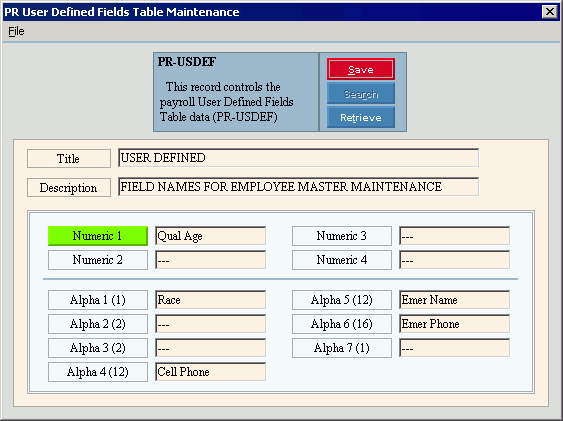
PR User Defined Fields Table Maintenance (PR-USDEF)
Use PR User Defined Fields Table Maintenance to maintain the labels of the User-Defined Fields, which you can maintain during Employee Master Maintenance in the User Defined Fields Area. There are four numeric fields and seven alphanumeric fields that your facility can use for their own purposes.
Notes:
If you need more fields for storing employee information, you can create the Employee User-defined Extended Fields.
You can not create new PR User Defined Fields tables. The necessary table is created during the software installation and updates. To maintain the PR User Defined Fields table, see the instructions below.
Directions:
To open click Payroll
from the Menu. Then,
click Miscellaneous File Maintenance,
Table FM, Alpha Tables and click PR
User Defined Fields (PR-USDEF).
Tip: Or, use the keyboard
shortcut: [ALT] [p] [m] [a]
[u].
PR User Defined Fields (PR-USDEF) Window Example:
PR User Defined Fields Table Maintenance Prompts
|
|
Editing User Defined Fields |
1. Click the field to change. 2. Enter the new information. 3. To complete the edit
process, click Save
Note: To maintain data integrity, you can not delete the PR User Defined Fields table. |
The program sets the Table ID to PR-USDEF. This is displayed when the screen opens. Tip: This maintenance is for a single table. |
|
|
To update the changed information, click Save or press [ENTER]. Keyboard shortcut: [ALT + s] |
|
|
Enter the Table Title, which is an abbreviated name for the table. (up to 14 characters) |
|
Enter the Table Description, which is the full name of the table. (up to 79 characters) |
|
Enter the Employee Numeric User-Defined Field Labels for up to four numeric fields. (up to 12 characters) |
|
Enter the Employee Alpha User-Defined Field Labels for up to seven alphanumeric fields. (up to 12 characters) Tip: The numbers in parentheses () following the fields indicate the number of characters allowed for the information in each Alpha User-Defined Field. |
|

 , or press
  CAUTION: To avoid losing
data, you must save changed information.
CAUTION: To avoid losing
data, you must save changed information.