Employee Other Earnings Report Instructions
Use the Employee Other Earnings Report to list information about employee other pay including unit and amount totals for month-to-date, quarter-to-date, and year-to-date.
Tips:
This report is also known as the Other Pay Earnings Report.
Do not confuse the following reports, which all contain other pay information:
Employee Other Earnings Report: For each employee, lists the other pay amount and unit totals for MTD, QTD, and YTD.
Other Pay Totals Report: For each Other Pay Code, lists the totals for MTD, QTD, and YTD.
Other Pay Master Edit List: For each Other Pay Code, lists the master information but no totals.
To see an example of the report, click Employee Other Earnings Report Sample.
Directions:
To open click Reporting from the Menu.
Then, click Earnings Reports and
click Employee Other Earnings.
Or, use the keyboard
shortcut: [ALT] [e] [e] [o].
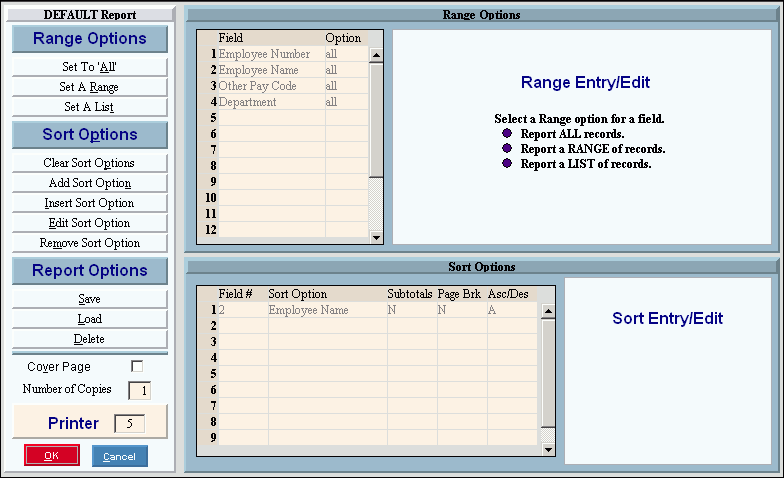
Employee Other Earnings Report Window Example:
Employee Other Earnings Report Options
|
|
Report Writer Range & Sort |
You can make changes to the Report Writer range and sort as needed. For more information on changing the range or sort options, see Report Writer Overview. |
Additional Options |
To include a cover page, check the Cover Page box. To include a detail separator, click to check the Detail Separator box. To omit the detail separator, leave the box unchecked. |
|
To generate the report, click Print, or press [ENTER]. Keyboard shortcut: [ALT + p] To print to the Print
View window, click Print
View To escape from the print
routine, click Close |


 .
.