Employee Quarterly Totals Maintenance - Overview
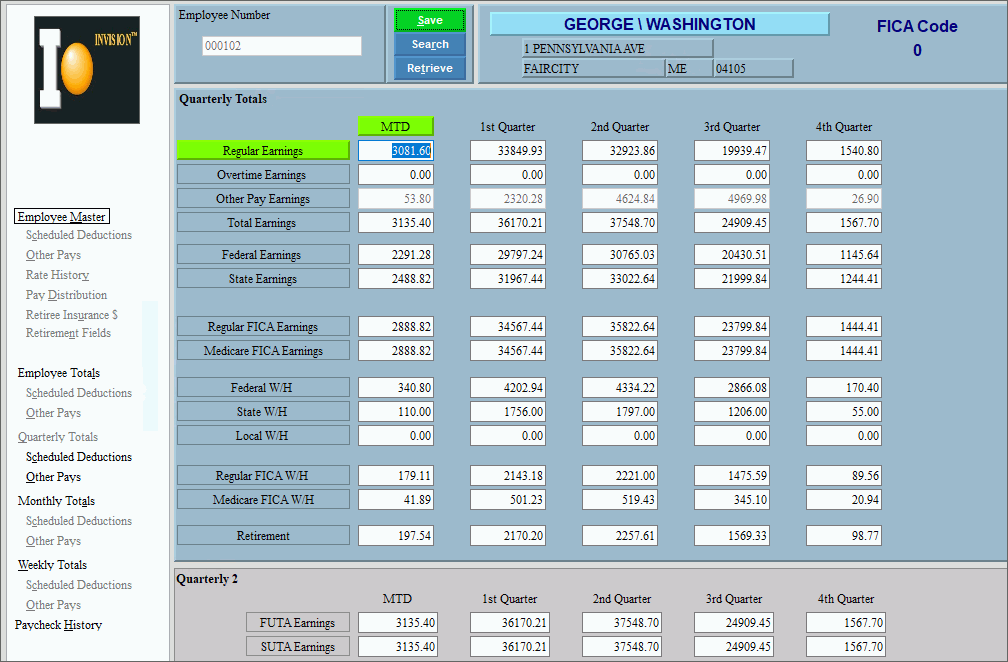
Use Employee Quarterly Totals Maintenance to view total earnings and withholding amounts for the current month and the four quarters of the current year. The fields are updated by the system, so you normally do not need to edit them.
Directions:
To open click Quarterly Totals
in the Employee File
Maintenance - Menu Tree.
Keyboard shortcut: [ALT + l]
Or, click Payroll from the Menu, Employee
File Maintenance, and Employee
Quarterly Maintenance.
Keyboard shortcut: [ALT] [p] [e]
[q]
Employee Quarterly Totals Maintenance Window Example:
Field Details by Section Tip: You can see the following areas in the main Employee Quarterly Totals Maintenance window. |
|
Open Employee File Maintenance programs. |
|
Employee Quarterly Totals Area Displays the totals for various earnings and withholding amount fields for the current month and four quarters. For each field listed below, the totals display for the current month, Quarter 1, Quarter 2, Quarter 3, and Quarter 4. |
|
Displays the Regular Earnings Totals for the current month and four quarters. (6.2 numeric) |
|
Displays the Overtime Earnings Totals for the current month and four quarters. (6.2 numeric) |
|
Displays the Other Pay Earnings Totals for the current month and four quarters. (7.2 numeric) |
|
Displays the Gross Pay Earnings Totals for the current month and four quarters. (6.2 numeric) |
|
Displays the Federally Taxable Earnings Totals for the current month and four quarters. (6.2 numeric) |
|
Displays the State Taxable Earnings Totals for the current month and four quarters. (6.2 numeric) |
|
Displays the Local Taxable Earnings Totals for the current month and four quarters. (6.2 numeric) |
|
Displays the Regular FICA Earnings Totals for the current month and four quarters. (6.2 numeric) |
|
Displays the Medicare FICA Earnings Totals for the current month and four quarters. (6.2 numeric) |
|
Displays the Federal Tax Withholding Amount Totals for the current month and four quarters. (6.2 numeric) |
|
Displays the State Tax Withholding Amount Totals for the current month and four quarters. (6.2 numeric) |
|
Displays the Local Tax Withholding Amount Totals for the current month and four quarters. (6.2 numeric) |
|
Displays the Regular FICA Withholding Amount Totals for the current month and four quarters. (6.2 numeric) |
|
Displays the Medicare FICA Withholding Amount Totals for the current month and four quarters. (6.2 numeric) |
|
Displays the Retirement Deduction Withholding Amount Totals for the current month and four quarters. (6.2 numeric) |
|
Employee Quarterly2 Totals Area View the totals for unemployment earnings amounts for the current month and four quarters. |
|
Displays the FUTA (Federal Unemployment Tax Authority) Earnings Totals for the current month and four quarters. (6.2 numeric) |
|
Displays the SUTA (State Unemployment Tax Authority) Earnings Totals for the current month and four quarters. (6.2 numeric) |
|
Tip: To display the following areas in Employee Quarterly Totals Maintenance, you must click the appropriate option in the Menu Tree. |
|
Displays the totals for scheduled deductions. |
|
Displays the quarterly totals for other pay earnings. |
|
Editing Quarterly Employee Totals |
1. Enter the Employee Number and click Retrieve
2. Position the pointer to the information that you want to change. 3. Enter the changes. 4. To complete the edit
process, click Save
|

 CAUTION: To avoid losing data,
you must save changed employee totals.
CAUTION: To avoid losing data,
you must save changed employee totals.

