button, which you can use to open an existing set of options for the report.
Report Writer - Load Saved Report
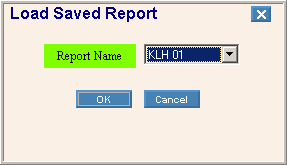
The table below describes the prompts for the Load button, which you can use to open an existing set of options for the report.
|
Load Saved Report Prompts Tip: To see information about other Report Options buttons, refer to Report Writer - Report Options. |
|
|
Example |
|
|
Report Name |
To open an existing set of options, click a Report Name in the drop-down list. |
|
|
To open the set of report writer options click OK, or press [ENTER] if the button is in focus. |
|
|
To escape without displaying the set of report writer options click Cancel, or press [ENTER] if the button is in focus. |