Restrict Fiscal Year Processing
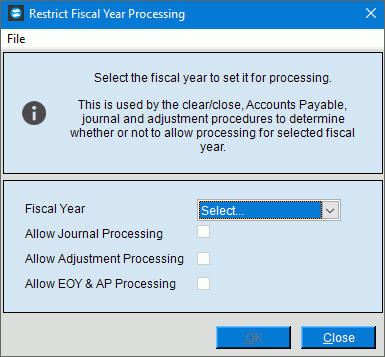
Use Restrict Fiscal Year Processing to set options that control functions that are available to users within a selected prior year, if desired. When Start a Fiscal Year End is run then these options are automatically activated for the prior year that is created during that process. You can change the settings throughout the year as needed.
Directions:
To open Start Fiscal Year End click Year End and then click Restrict Fiscal Year Processing.
Restrict Fiscal Year Processing Window Example:
Restrict Fiscal Year Prompts
|
|
Fiscal Year |
Select the historical fiscal year for the settings. |
Allow Journal Processing |
To allow journal processing in the selected prior year, check the box Allow Journal Processing. To prevent journal processing in the selected prior year, leave this box blank. |
Allow Adjustment Processing |
To allow adjustment processing in the selected prior year, check the box Allow Adjustment Processing. To prevent adjustment processing in the selected prior year, leave this box blank. |
Allow EOY Processing or Allow EOY Processing & AP Processing |
Note: If automatic Clear and Close entries are turned on, then only Allow AP Processing displays. If Clear and Close is done manually then Allow EOY & AP Processing displays. Allow AP Processing:
Allow EOY Processing & AP Processing:
|
|
To update the new or changed information, click OK or press [ENTER]. |
|
|
|
To close the window, click Close. |


 CAUTION: To avoid losing
information, you must save new or changed information.
CAUTION: To avoid losing
information, you must save new or changed information.