Opening the Electronic Billing Review Log Instructions, click More.
1. Click Billing Functions from the Menu Bar.
2. Click Communications.
3. Click Professional Claims.
4. Click Medicare.
Note: Medicare is used as the carrier in the
menu example. Please select the appropriate insurance carrier
name for your processing.
5. Click Review Log.
Advanced
Methods:
Click the following sequence:
From the Communications
Floating Menu Panel, click the carrier
name; and click Review
Log.
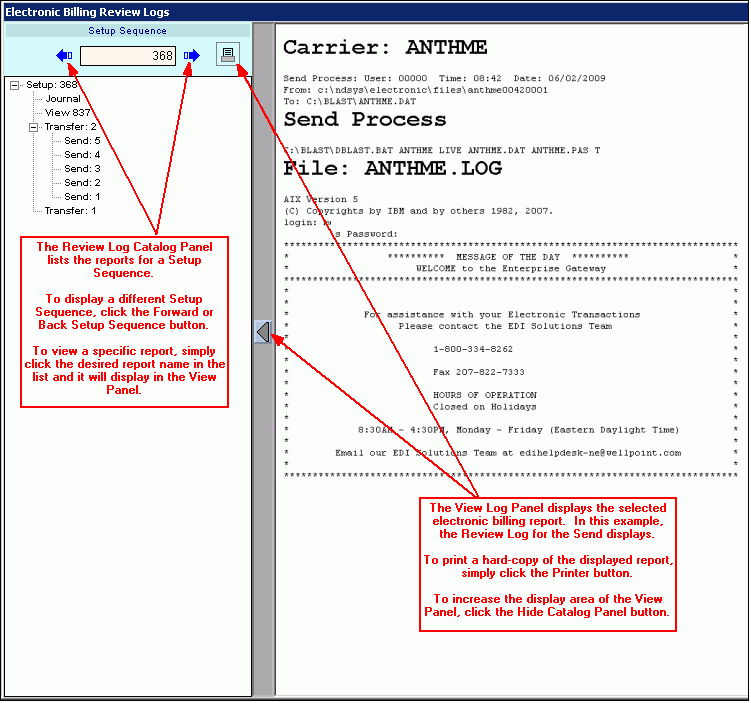
Electronic Billing Review Log Instructions Window Example:
Choosing the Selections at the Prompt Window, click More.
Review Log Prompts Tip: To see more information about a field, click the hyperlink for the field name. |
|
Setup Sequence |
Displays the most recent Setup Sequence in the Log Catalog Panel. To select a particular log, first click to select the appropriate Setup Sequence and then select the session log for that Setup Sequence. Notes:
|
Setup Sequence Catalog |
To display a specific log in the View Log Panel, click the appropriate selection in the Review Log Catalog Panel. Notes:
|
View Log Panel |
Displays the details of the Review Log, Receive Log or other reports. Tips:
|
|
To print a hard-copy of the session log or report to the Windows® default printer, click Print. |
|
To escape from the routine:
|
 .
. .
. .
. .
. .
. .
.

Report Sample(s), click More.
To see an example of the report, click Electronic Billing Print Journal Sample.
To see an example of the report, click Review Log Sample.
To see an example of the report, click Receive Log Sample.
