State Withholding Tax Table Maintenance - Vermont (W/Hx03)
Use State Withholding Tax Table Maintenance - Vermont to maintain tax information for employees who must pay taxes to the state of Vermont who are married or single.
Tips:
You must set up this tax table if you facility is located in Vermont or if you have any employees located in Vermont.
Vermont state tax tables include the following Table IDs:
W/HM03: Married
W/HS03: Single
Normally, you must update the tax tables with applicable rate changes once each year - after generating W-2s and before running the first payroll of the calendar year.
For a list of tax tables for other states, see the State Withholding Tax Table Maintenance Overview (W/Hxnn & CTnnn).
Directions:
To open:
1. Click Payroll from the Menu.
2. Click Miscellaneous File Maintenance.
3. Click Table FM.
4. Click Numeric Tables.
5. Click State
Withholding Tax.
Tip: Or, use the keyboard
shortcut: [ALT] [p] [m] [n]
[w].
6. The tax table for your facility's
State Code displays.
Tip: If your facility is not in Vermont, click 3
- Vermont in the drop-down list at the bottom of the screen.
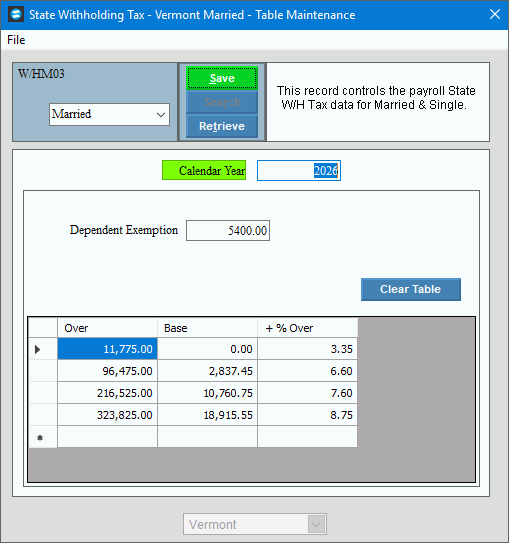
State Withholding Tax - Vermont Married - Table Maintenance Window Example:
Note: The tax limits and rates in the following table are only an example. Actual tax withholding information is published annually.
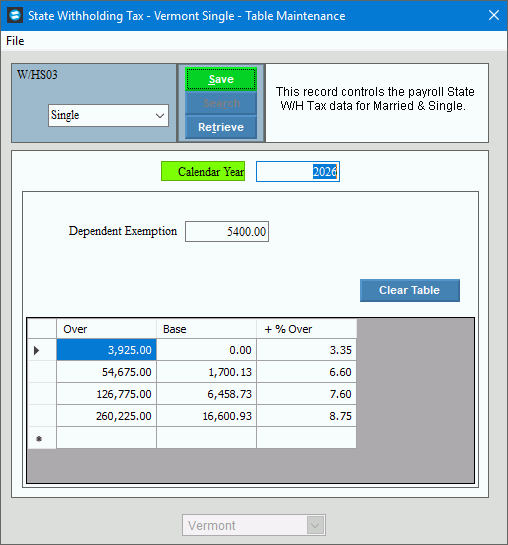
State Withholding Tax - Vermont Single - Table Maintenance Window Example:
Note: The tax limits and rates in the following table are only an example. Actual tax withholding information is published annually.
State Withholding Tax Table Maintenance - Vermont Prompts
|
|
To display the tax table maintenance window for a different state, click the State Code in the drop-down list. (predefined) |
|
To specify whether you want to maintain the tax table for married or single taxpayers, click one of the following options in the drop-down list and click Retrieve, or press [ENTER].:
Tip: Vermont maintenance is for a multiple tables, each table containing a single record. |
|
Enter the State Dependent Exemption amount. (numeric 6.2) |
|
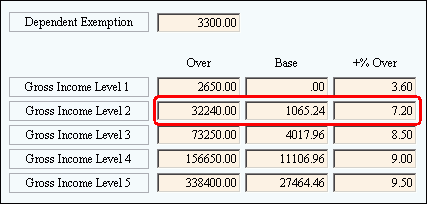
For Gross Income Levels, enter the Over amount, which is the earnings cutoff amount used to determine the Base Amount to Withhold. (6.2 numeric) Tax
Calculation Example - Vermont Single Taxpayer: If a single person's annual gross wage is $40,350.00...
Notes:
|
|
For Gross Income Levels, enter the State Base Amount to Withhold, which is the flat tax amount to withhold based on the Gross Income Level Over Amount. (6.2 numeric) |
|
For Gross Income Levels, enter the State Plus % of Excess Over Rate, which is the percentage used to calculate the excess withholding amount based on the Excess Taxable Amount. (6.2 numeric) |
|
|
To update the changed information, click Save or press [ENTER]. Keyboard shortcut: [ALT + s] |
|
|
Editing a State Table |
1.
To display the record to be changed, click Married
or Single in the Table ID drop-down list. Then,
click Retrieve 2. Position the pointer to the information that you want to change. 3. Enter the data changes. 4. To complete the edit
process, click Save
|


 CAUTION: To avoid losing
data, you must save changed information.
CAUTION: To avoid losing
data, you must save changed information.