Payroll Check Lists Instructions
Use the Payroll Check Lists to generate 3 different types of reports. You can create a list of outstanding checks that have not been marked as Deleted or Voided. These checks should correspond to the checks appearing on your current bank statement. You can print the Deleted/Voided Check List that lists all the checks that have been marked as Deleted or Voided. These checks should correspond to the checks on your current bank statement after they have been marked using the Check Delete function. Run this report prior to running the Check Purge. In addition, you can run the All Checks List that prints all the checks in the Check Reconciliation file. Reconciliation.
Tips:
This routine prints the Payroll Outstanding Check List and the Payroll Deleted/Voided Check List.
To see examples of the reports, click Payroll Check Lists Samples.
Directions:
To open click Utilities from
the Menu. Then, click
PR Check Reconciliation and
click Lists.
Or, use the keyboard
shortcut: [ALT] [t] [p] [l].
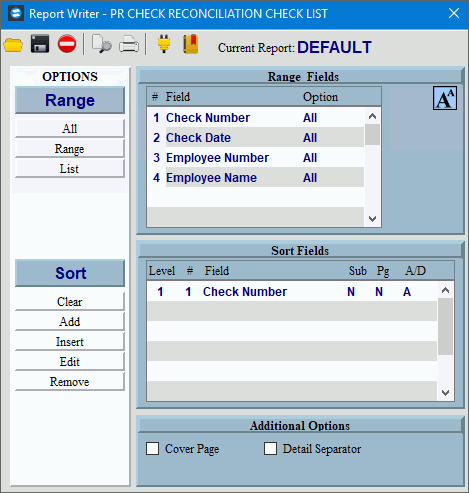
Payroll Check Lists Window Example:
Payroll Check Reconciliation Lists Options
|
|
Report Writer Range & Sort |
You can make changes to the Report Writer range and sort as needed. For more information on changing the range or sort options, see Report Writer Overview. |
Additional Options |
To include a cover page, check the Cover Page box. To include a detail separator, click to check the Detail Separator box. To omit the detail separator, leave the box unchecked. |
|
To generate the report, click Print, or press [ENTER]. Keyboard shortcut: [ALT + p] To print to the Print
View window, click Print
View To escape from the print
routine, click Close |
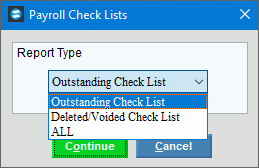
After selecting Print or Print View the following options are displayed. Payroll Check List Window Example:
|
|
Report Type |
To specify the report type, click one of the following options in the list:
|
|
To begin generating the report, click Continue. Keyboard shortcut: [ALT + o] To escape from the print routine, click
Cancel Keyboard shortcut: [ALT + c] |


 .
.

 .
.