PR F/A Invoice Post Instructions
Use the PR F/A Invoice Post process to update Accounts Payable in the Fund Accounting module with the invoice transactions for vendors to be paid. The invoice transactions are originally generated by one of three programs: Payroll Post, Post to Vendor Transaction Files, or Fringe Distribution Post.
Notes:
Confirm
that the invoice transactions on the PR
A/P Invoice Transaction Journal are correct before running the
PR F/A Invoice Post.
INVALID VENDOR: If there are any vendors listed for Vendor Number 000000, you will not be able to run the
post. The problem may be caused by a blank Vendor Number associated
with a Deduction Code or Fringe Number.
Contact NDS Support
for assistance.
This program is applicable only if you use the Vendor Invoices and Checks feature. The Company Control Option for Create Automatic Vendor/Invoices Checks must be set to 1 - Single Post or 2 - Dual Post.
This program processes invoice transactions for Deductions and Fringes that are coded with a Vendor Payment Method of (I)nvoice.
For more information, refer to the topic Understanding Vendor Invoices and Checks.
For information about the timing for running Payroll Fund Accounting programs, refer to the Payroll Runbook.
To see an example of the report, click PR F/A Invoice Post Report Sample.
Directions:
To open click Payroll from the
Menu. Then, click Vendor Invoices and Checks --> Payroll
A/P --> PR F/A Invoice Post.
Or, use the keyboard
shortcut: [ALT] [p] [v] [f]
[p].
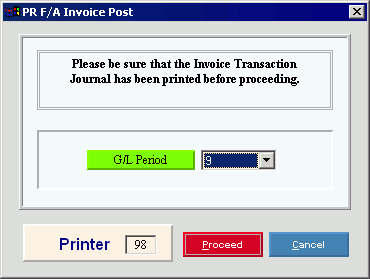
PR F/A Invoice Post Window Example:
PR F/A Invoice Post Options
|
|
In the drop-down list, click the General Ledger Period Number for the posted entries. (1 - 13) |
|
|
To run the routine and generate the report, click Proceed, or press [ENTER]. Keyboard shortcut: [ALT + p] To escape from the routine, click Cancel Or, click Close
|




