Click Enter Owner/Legal Residence Information in the Steps Panel.
Or,
click Next  or
click Back
or
click Back  until
the data that you want to maintain displays in the Data Entry Panel.
until
the data that you want to maintain displays in the Data Entry Panel.
Special Permit Wizard - Enter Owner/Legal Residence Information Step
Use the Enter Owner/Legal Residence Information Step to enter the owner name, address and owner legal residence information for the vehicle special permit. The table following the panel example describes the data entry for this step in the Special Permit Wizard.
Tip: For general information about using wizards, see the Wizard - Introduction.
Directions:
To display the Enter Owner/Legal Residence Information Step in the Data Entry Panel:
1. Open the Special Permit Wizard.
2. To navigate to the step that you want to maintain:
Click Enter Owner/Legal Residence Information in the Steps Panel.
Or,
click Next or
click Back until
the data that you want to maintain displays in the Data Entry Panel.
Data Entry Panel - Enter Owner/Legal Residence Information Step Example:
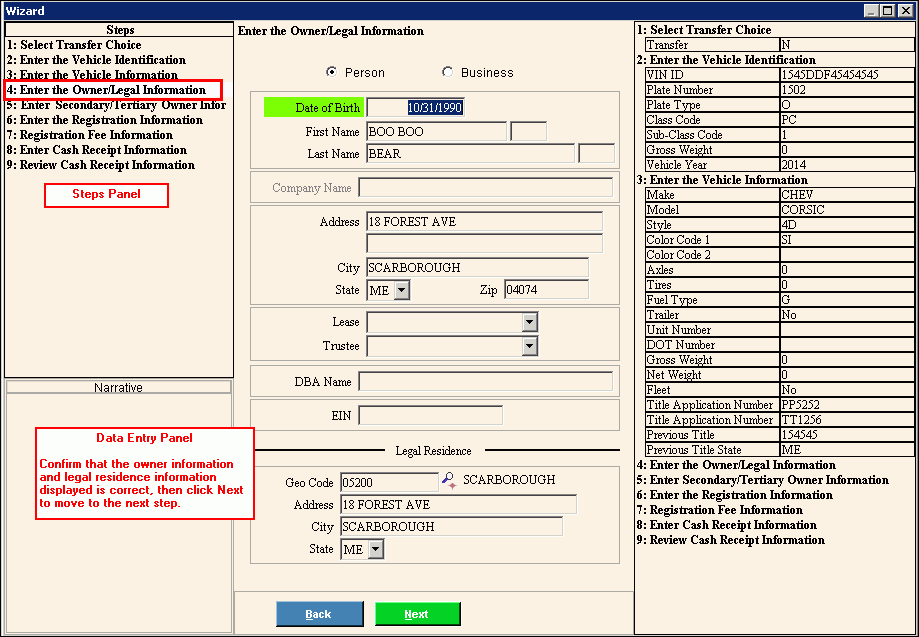
Data Entry Panel - Enter Owner/Legal Residence Information Step Prompts Tip: To see more information about a field, click the hyperlink for that field name. |
|
Person |
To indicate the owner is an individual, accept the default Person. To indicate the owner is a company, click to select Business. Note: If you select Business, the Company Name field is activated and DOB through Last Name is de-activated. |
Enter the owner's date of birth. (mmddccyy - slashes and century optional) REQUIRED Notes:
|
|
Enter the owner's first name. (up to 20 characters) REQUIRED |
|
Enter the owner's middle initial, if applicable. (1 character) |
|
Enter the owner's last name. (up to 50 characters) REQUIRED |
|
Enter the suffix for the owner's name, if applicable. (up to 3 characters) |
|
Enter the company name if a company is the owner of the vehicle. (up to 100 characters) Note: To activate the Company Name field, click Business. |
|
For a business, enter the Employer Identification Number (also called the Federal ID Number), if applicable. (up to 9 characters) |
|
Enter the first line of the owner's mailing address. (up to 50 characters) REQUIRED |
|
Enter the second line of the owner's mailing address, if applicable. (up to 50 characters) |
|
Enter the default city or town name. (up to 50 characters) REQUIRED |
|
Enter the default state abbreviation. (2 characters) REQUIRED |
|
Enter the default Zip Code. (up to 10 characters) REQUIRED |
|
Enter the owner's Doing Business As name, if applicable. (up to 50 characters) |
|
Enter the owner lease/lessee information, if applicable. |
|
Enter the vehicle owner trustee information, if applicable. |
|
Legal Residence Information |
|
Accept the Geo Code for the owner's municipality of residence or, enter another defined Geo Code. (up to 5 characters) REQUIRED Notes:
|
|
Enter the owner's street address within the municipality. (up to 50 characters) |
|
Accept the Geo Code municipality for the special permit or, enter another municipality. (up to 50 characters) |
|
Displays the Geo Code State Code for the special permit or, enter another state. (2 characters) |
|
|
To display the previous step, click Back. Keyboard shortcut: [ALT + b] |
|
To display the next step, click Next or press [ENTER]. Keyboard shortcut: [ALT + n] |
|
To close the wizard without validating or saving the data, click Close. |
 or press
  or
press
or
press 