Employee Totals Master Maintenance - Overview
Use Employee Totals Master Maintenance to view totals for time worked, withholding amounts, earnings, vacation time accruals, and sick time accruals. The fields are updated by the system, so you normally do not need to edit them.
Tips:
Employee Master Maintenance automatically creates new totals when you add an employee, so you can not add employee totals using this program. You can only edit the totals information.
You can view the history of the totals in the following programs:
Directions:
To open click Employee Totals
in the Employee File
Maintenance - Menu Tree.
Keyboard shortcut: [ALT + l]
Or, click the following sequence:
Payroll from the Menu,
Employee File Maintenance, and
Employee Totals Maintenance.
Keyboard shortcut: [ALT] [p]
[e] [t]
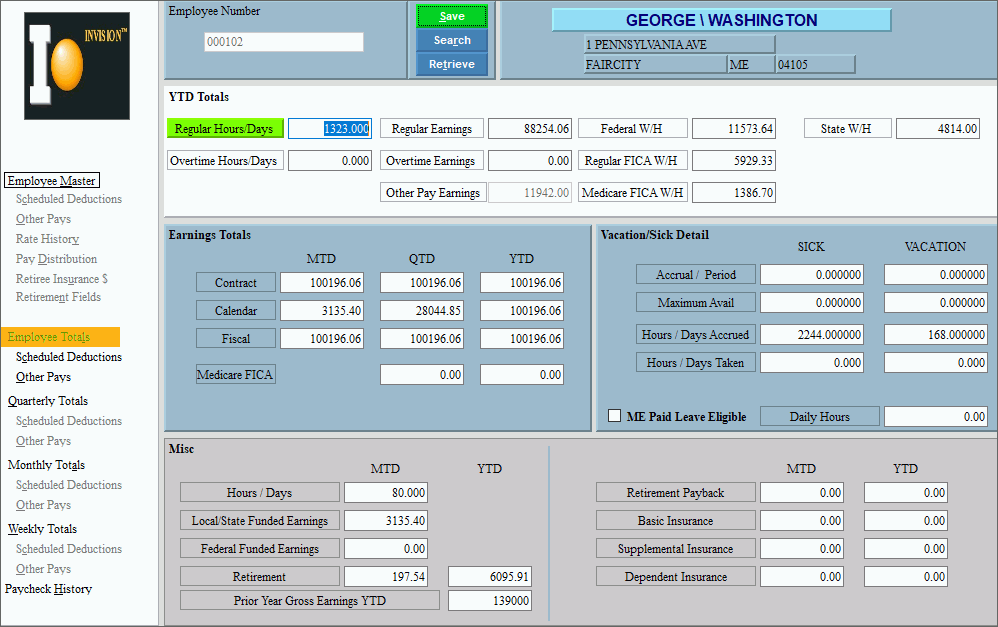
Employee Totals Maintenance Window Example:
Employee Totals Maintenance by Section Tip: You can see the following areas in the main Employee Totals Master Maintenance window. |
|
Open Employee File Maintenance programs. |
|
Year-to-date Earnings View the totals for time worked, earnings, and withholding amounts for the current year. |
|
Displays the accumulated regular time number of hours or days worked so far this year. (4.3 numeric) |
|
Displays the accumulated overtime time number of hours or days worked so far this year. (4.3 numeric) |
|
Displays the total for Regular Earnings accumulated so far this year. (7.2 numeric) Note: The Regular Earnings total includes shift differential earnings, which are identified by the Other Pay Type (7 - Shift Differential) for an Other Pay Code. |
|
Displays the total for Overtime Earnings accumulated so far this year. (7.2 numeric) |
|
Displays the current total for Other Pay Earnings accumulated so far this year. Notes:
|
|
Displays the total amount withheld for federal taxes so far this year. (5.2 numeric) |
|
Displays the total amount withheld for regular FICA taxes so far this year. (5.2 numeric) |
|
Displays the total amount withheld for Medicare FICA taxes so far this year. (5.2 numeric) |
|
Displays the total amount withheld for state taxes so far this year. (5.2 numeric) |
|
Displays the total amount withheld for local taxes so far this year. (5.2 numeric) |
|
Employee Earnings Totals Area View the earnings totals for the current month, quarter, and year and the current year-to-date time worked, earnings, and withholding amounts. These fields are automatically updated, so you do not normally need to edit them. |
|
Contract |
Note: The Period End Clear process clears the following fields when you specify contract.
|
Calendar |
Note: The Period End Clear process clears the following fields when you specify calendar.
|
Fiscal |
Note: The Period End Clear process clears the following fields when you specify fiscal.
|
Displays the gross earnings for the current quarter for Medicare-Only FICA. Note: This applies only to earnings for employees whose FICA Code is 2 - Medicare Only. |
|
Displays the gross earnings for the current year for Medicare-Only FICA. Note: This applies only to earnings for employees whose FICA Code is 2 - Medicare Only. |
|
Displays accrual totals for vacation and sick time. |
|
Displays the totals for retirement-related fields. |
|
Tip: To display the following areas in Employee Totals Master Maintenance, you must click the appropriate option in the Menu Tree. |
|
Displays the totals for scheduled deductions. |
|
Displays the totals for other pay. |
|
Editing Employee Totals |
1. Enter the Employee
Number and click Retrieve
2. Position the pointer to the information that you want to change. 3. Enter the changes. 4. To complete the edit
process, click Save
|
Deleting Employee Total |
Notes:
|

 CAUTION: To avoid losing data,
you must save changed employee totals.
CAUTION: To avoid losing data,
you must save changed employee totals.

